 Phase 2 · You do more than write now
What the agreement says, with the article in front of you
“The house notebook” series (1 of 5). Marta compares two agreements with their articles and checks an infographic before putting it up. Two videos: the tool (5 min) and the case (12 min), approximately.
Pill 2.5 · “The house notebook” series (1 of 5) · What Gemini Notebook is, and asking questions of a long document with the citation in front of you KYBERVET Academy · Clínica El Roble · Phase 2: Make it work, not just answer · Two videos: the tool (5 min) and the case (12 min)

 12:05
12:05Clínica El Roble is a fictional educational case. Its two personal days are a fictional improvement at that practice, not the entitlement in the national agreement or a note included in the downloadable PNG.
The full story · Clínica El Roble
The scene
Tuesday, during the morning. The shutter is halfway down and the sign on Olmos street is still lit from the night before, casting cyan across the glass door.
Sara does not look up from her phone.
—A colleague at another practice says the new agreement gives you a day off if your dog dies.
—Or your cat —says Hugo.
—Or your cat.
From the stockroom, without coming out, Diego asks the only question he is going to ask all morning:
—And the mileage?
Diego takes samples to the laboratory in his own car when the courier does not come, and they pay him what the agreement says. He wants to know whether what the agreement says has changed.
Marta says she will check. She knows where it is. She read the whole 2023 agreement when it came out, pencil in hand, and the notes are still in the margins of the copy the payroll and tax advisor sent her. She downloaded the new one in September and it is sitting on the computer desktop, unopened.
The nudge
At 20:10, with the practice closed, Marta opens both.
The old one first, out of habit. She goes straight to the mileage allowance without searching, because she knows where it is: article 37, underlined, twenty-two cents. She opens the new one. Article 37, the same sentence in the same place, with a different figure. She stares at the underlining. It is the article she knows by heart, and it is no longer the one in force.
She spotted that on her own. The problem is everything else: seventy-three pages in which anything could have moved or changed number, and four people with questions. If she does the same for every question, it will take all week.
Hugo, who stayed to finish a clinical record, walks past the office with his jacket on. He sees the two open documents and the pencil on the desk, and before Marta can ask him anything he has already turned his phone towards her.
On the screen is a notebook with the notes from the course he is taking: four PDFs on the left and, in the centre, a question of his with the answer below. Beside each sentence, a number.
—You put the papers in and ask it. And the number takes you to the page it got it from.
—And if I put both agreements in?
—It tells you what the right one says.
Marta looks at him over her glasses.
—We’ll see about that.

The task
Hugo takes his jacket off. In the sidebar of Gemini, which Marta uses every day, there is an entry she had never noticed: Notebooks. He shows her where to put the papers, where to ask questions and where to make everything else.
She gives it both agreements, the old one deliberately. And before asking anything she writes one condition: if the papers say different things about the same subject, it must not choose. It must show her both.
—What’s that for? —asks Hugo.
—You’ll see.
Sara’s question is answered in thirty seconds. One day, article 46 of the new agreement. Marta clicks the number and is at the BOE paragraph, with the requirements: the animal must belong to you or your partner, its health record and the document confirming its death.
Diego’s answer comes back with two figures, twenty-two and twenty-six cents, each with its citation. Both citations say article 37. Marta clicks the one for twenty-two and the 2023 agreement opens.
—Right —says Hugo, laughing—. Noted.
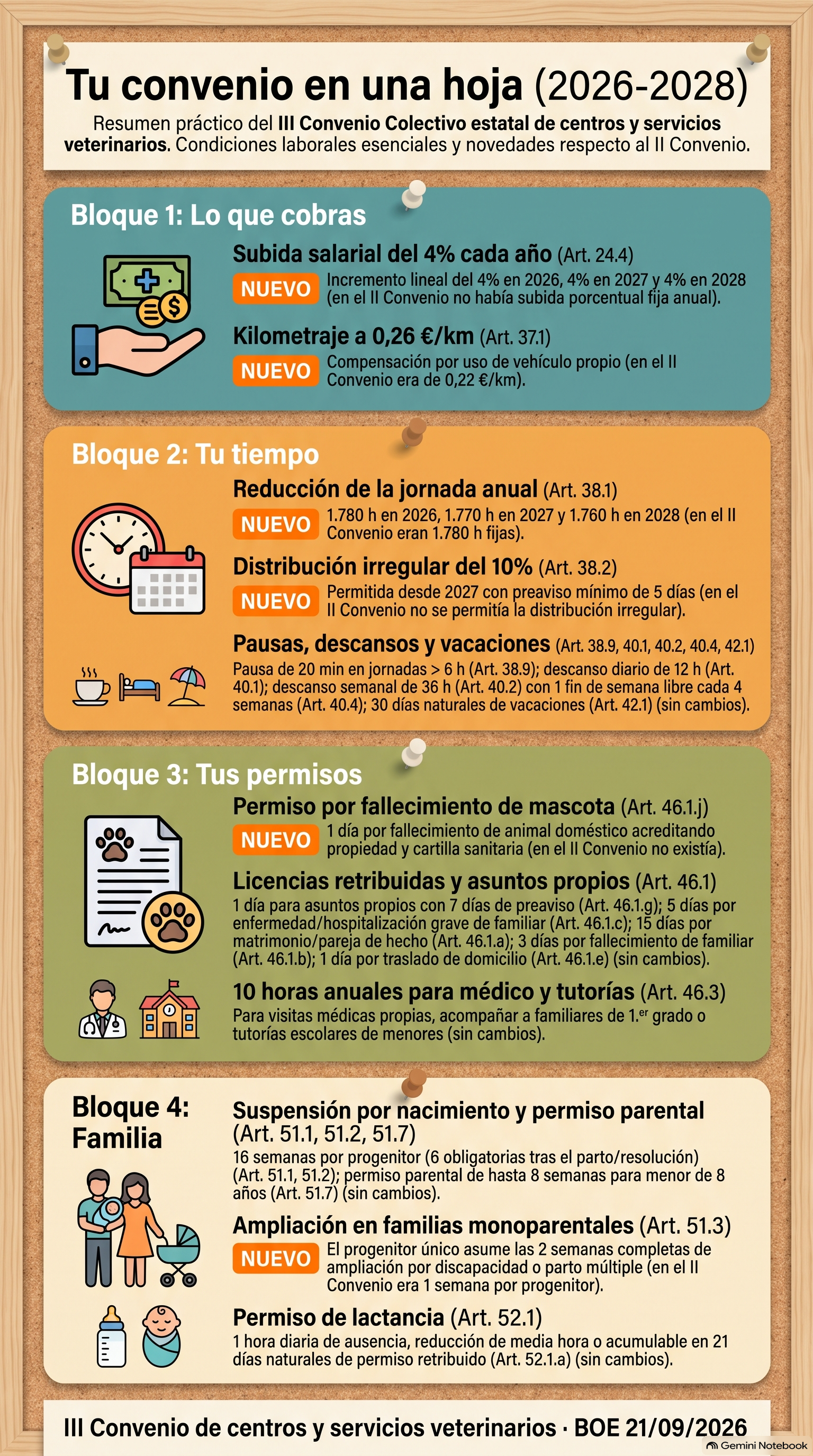
Marta unticks the 2023 agreement for everyday use and asks him to show her the panel on the right. She wants a sheet for the notice board and the team group, and she decides what goes in: pay, working time, leave and family arrangements, with anything new marked. No on-call shifts, because El Roble has none. The tool draws it in a minute.
Before putting it up, she checks the figures in the chat, which is where the citations are, because the image does not have them. She stops at personal days. One day a year, the sheet says, and that is what the agreement says. At El Roble they have had two for years, and that is not in any BOE. She adds it at the bottom as a practice note and generates it again.
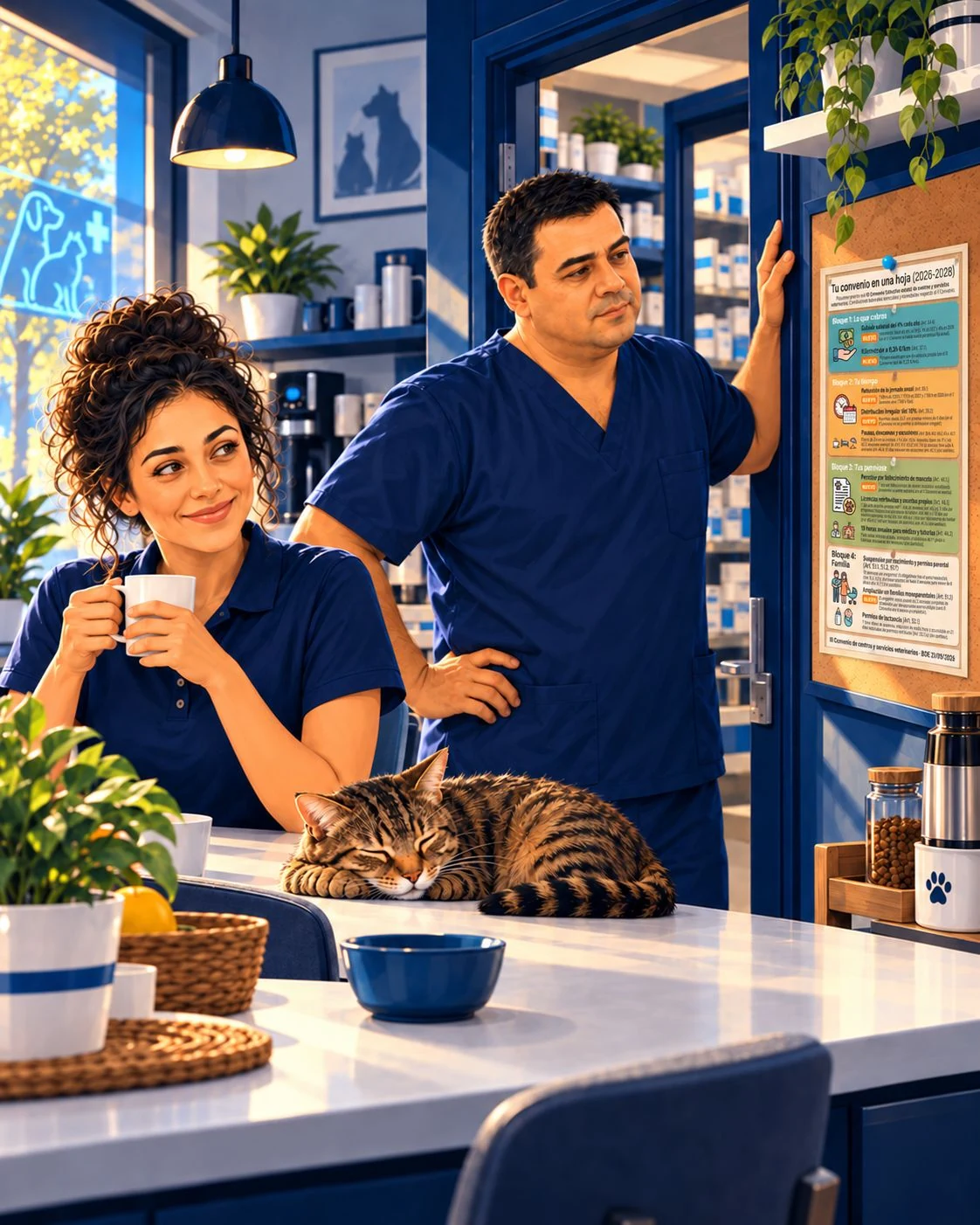
The next morning the sheet is on the notice board. Diego reads it from top to bottom and goes back to the stockroom. Sara reaches the line about the requirements and looks at Roble, asleep on the index-card box with his notched ear facing the door.
—And for the purposes of the agreement, who does Roble belong to?
Nobody answers. Neither does Roble.
The breakthrough
One. What Gemini Notebook is and why it is not just another chat.
 5:16
5:16
· If this is your first time opening it, start here. It works as an introduction to all five pills in the series.
It is what was called NotebookLM until July 2026: a Google tool that works with your account and also appears inside Gemini as “Notebooks”. A notebook is a space for one subject, with three areas. On the left, the sources: your papers (PDFs, links, Drive documents, YouTube videos or pasted text), and you can tick or untick each one. In the centre, the chat. On the right, Studio, which turns those same sources into something else: audio, a video, a presentation, a quiz, an infographic or a table.
It differs from asking an ordinary chat in three ways. It answers from your sources, not from its general knowledge or what it finds online. It shows you where each sentence comes from: each has a number that takes you to the exact paragraph. And it stays: tomorrow your papers are still there, without having to upload them again.
Two. Click the citation before trusting a figure, and choose your sources. Answering from your sources does not guarantee it will not make mistakes. With two versions of the same paper inside, it can give you the old one, citation and all, and the citation will look fine. Almost every practice has the 2023 agreement saved, and the mileage allowance is in article 37 of both: €0.22 in one and €0.26 in the other. Before trusting a figure, click. And for everyday use, untick the old source.
Three. What comes out of Studio no longer has citations. The infographic is what really saves time: the whole agreement on one sheet the team can read standing up, made in a minute. But it is an image, and an image has no numbers you can click. Check the figures in the chat before putting it up. Then add what only you know, because your practice is not in the BOE.
What came out at El Roble
What went on the notice-board sheet, checked against the BOE text on 7 October 2026. To apply it to a particular case, read the article.
Your pay
| Now (III Agreement) | Art. | |
|---|---|---|
| Pay increase | New. 4% in 2026, 2027 and 2028; if annual CPI exceeds 4%, a review of up to 1.25% | 24.4 |
| Mileage allowance for your own car | New. €0.26/km (previously 0.22) | 37.1 |
Your time
| Now (III Agreement) | Art. | |
|---|---|---|
| Annual working time | New. 1,780 h in 2026, 1,770 h in 2027 and 1,760 h in 2028 (previously 1,780) | 38.1 |
| Irregular distribution of working time | New. Up to 10% from 2027, with 5 days’ notice (previously not provided for) | 38.2 |
| Break during an uninterrupted working day | 20 min if it exceeds 6 h; 45 min if it exceeds 9 h | 38.9 |
| Rest periods | 12 h between working days, 36 consecutive hours each week and one free weekend in every four | 40 |
| Holidays | 30 calendar days | 42 |
Your paid leave
| Now (III Agreement) | Art. | |
|---|---|---|
| Death of your animal or your partner’s | New. 1 day, with its health record and the document confirming its death | 46.1.j |
| Unable to get to work because of a disaster or severe weather | New in the agreement. Up to 4 days | 46.1.i |
| Marriage or registered partnership | 15 calendar days | 46.1.a |
| Death of a relative up to the second degree | 3 days | 46.1.b |
| Serious illness or hospitalisation of a relative | 5 days | 46.1.c |
| Moving house | 1 day | 46.1.e |
| Personal days | 1 day a year, with 7 days’ notice | 46.1.g |
| Family force majeure | Up to 4 days a year | 46.1.h |
| Medical appointments or school meetings | 10 h a year | 46.3 |
Family
| Now (III Agreement) | Art. | |
|---|---|---|
| Suspension of the employment contract for childbirth | New. 19 weeks (previously 16) | 51.1 |
| Infant-care leave | 1 h a day until 9 months, half an hour less working time or 21 consecutive calendar days | 52.1 |
And at the bottom, as a practice note: At El Roble, there are two personal days.
The tool finds the article for you. Reading it, and deciding what goes on the notice board, is your job.
Do it yourself in 4 steps
- Create the notebook. At
notebook.google.com(or in Gemini, under “Notebooks”), choose “Create notebook”. In Settings, set the output language to English, as it often defaults to English. - Give it the sources and an instruction. Under “Websites”, paste the link to the agreement in the BOE. If you have the previous one, add it too, by link or from Drive. In the configure-chat icon, choose “Custom” and paste the instruction below. It applies to the whole notebook.
- Ask and click. Click the citation before trusting a figure. Untick the old version for everyday use.
- Make the sheet for the team. In Studio, choose “Infographic”, portrait orientation, with the brief below. Check the figures in the chat, add what only your practice knows and generate it again.
The notebook instruction · copy it
You help a small veterinary practice consult its collective agreement.
Answer only with what the sources in this notebook say.
Always say which document and which article each point comes from.
If the sources say different things about the same subject, do not choose: show me both and tell me which is the most recent.
If something is not in the sources, say so and do not fill it in.
Short answers, in British English.
The infographic brief · copy it
Create a portrait infographic for the notice board and the team group of a small veterinary practice.
Title: “Your agreement on one sheet (2026–2028)”.
Current information must come only from the III Agreement. Mark anything that has changed from the II Agreement with “NEW” and put what it was before in brackets.
Organise it in four sections:
1. Your pay: the pay increase for each year and the mileage allowance for your own car.
2. Your time: annual working time for each year, irregular distribution, breaks, rest periods and holidays.
3. Your leave: the days for each type of paid leave, including personal days and hours for medical appointments.
4. Family: suspension of the employment contract for childbirth and infant-care leave.
[Do not include anything about availability or on-call shifts.]
For each item, the article number.
At the bottom: “III Agreement for veterinary centres and services · BOE 21/09/2026”.
Short sentences and type readable from a metre away. Nothing not found in the sources.
The line in square brackets depends on your practice: if you do on-call shifts, remove that line and ask for one more section about availability. For your practice’s line, add at the end: “Also add at the bottom, separately and as a practice note: [what your practice offers above the agreement]”.
If you prefer something you can edit cell by cell, ask for a “Data Table” with the same brief and export it to a spreadsheet.
Before → Now
Before. One hundred and thirty-two pages of BOE across the two agreements, pencil underlining in the one no longer in force, and the team’s questions answered with what somebody said.
Now. Every answer with its article, and the agreement on a sheet the team can read standing up, with the line only Marta could add.
Before you start
- Read the text, not your case. The notebook tells you what the agreement says. If money or a disagreement is involved, the final word belongs to whoever handles your employment matters.
- The national agreement is the minimum. There may be a regional or company agreement, and better conditions at your practice. If there is a regional agreement, add it as a source; the payroll and tax advisor decides which takes precedence in each case.
- The summary at the top comes from the first source. The notebook writes its automatic summary from the first thing you put in: if you started with the old agreement, it will talk about the old one. Change it in “Customise”.
- Public material goes in; your team’s information does not. The BOE is fine. Payslips, contracts or personal data stay out of the notebook.
- The infographic is an image. You cannot correct it piece by piece: if a figure is wrong, change the brief and generate it again. And when you regenerate it, check again. The more information you ask for, the more you need to check: if it comes out too crowded, ask for two sheets.
- It works without paying. The free account allows up to 50 sources per notebook. Studio outputs use a shared usage allowance that refreshes every few hours; if it says “generate later”, that is why. At El Roble they use the practice’s paid account.
- The buttons will keep changing. Clicking the citation, choosing sources and checking before putting it up will remain the same.
Next week · 2.6 · Search further, but check who publishes it. Hugo expands a notebook without putting just anything in.
Resources for working with the article in front of you
Official public document in Spanish; consult the original article and its conditions.
Official public document in Spanish; consult the original article and its conditions.
This is not a legally validated sheet. The PNG says 16 weeks for childbirth, but current article 51.1 says 19; it also omits the document confirming the animal’s death from the leave requirements (46.1.j). It has printed article numbers, not clickable citations. It does not contain El Roble’s fictional two-day note.
Educational material derived from this pill; not an official document or employment advice.
Educational material derived from this pill; not an official document or employment advice.
Educational material derived from this pill; not an official document or employment advice.
Tool and limits: official Google sources
Gemini Notebook has been the official name since 16/07/2026. Standard allows 50 sources per notebook. Compute usage refreshes every five hours until the weekly limit; it may vary by plan. This workflow consults selected sources with an explicit instruction; agentic features may search the web or work without sources, and the Gemini app also uses tools. Do not generalise the first-source summary described in the case: official help describes a summary of all sources. Check which document it actually summarises. Do not upload payslips, contracts or personal data.
Editorial translation of the Spanish audio · What the agreement says, with the article in front of you
So, on to Marta's use case. First, Marta had last year's collective agreement, so she's going to add it: the 2023 one. She had it in Drive. If we come here, My Drive, Agreement, there it is. You insert it, and you have a source. But she also wants to add the 2026 agreement, which has just come out, by adding a website source: paste, insert. It links directly to the BOE (Spanish official gazette), and it will be able to read it without any problem. It's already recognising it: the first was the previous agreement, the second the 2023 one, and now we have the 2026 one. You can query a single document if you like, or all of them, or several, however you want. That's interesting too. So let's see the first interaction Marta wants to have. Of course, you can also customise the agreement notebook: give it a cover or upload an image, give it a different name, and set up a default configuration, summaries and a few other things you can play with. We won't touch them. Another interesting thing is that you can have a notebook and share it: you can add people directly with the link, or through other methods, as you do with documents. You can also configure the chat, which we're going to do now. We can also copy the notebook, look at analytics, and the app's own settings, which are still here. So, first let's configure the chat, in terms of the goal, style or role of the conversation. It can be the default, for research or general brainstorming; for learning, recommended for educational content, because it helps you understand new concepts and acquire skills efficiently; or you can make it custom. In this case, we'll give it a short prompt, which we have here. We paste it and say: you help a small veterinary clinic query its collective agreement. Answer only with what the sources in this notebook say. Always say which document and article each thing comes from. If the sources... sorry, it's a bit small. If the sources disagree on the same topic, don't pick one: show me both and tell me which is the most recent. If something isn't in the sources, say so and don't fill it in. Short answers in Spanish. We save it. There was also an option to configure the response length. We can leave it as default or make it short. We've already given it an instruction here, and it should respect it; if not, you can set it here. OK, we save. What's Marta's next step? Marta first wants to ask about what Sara told her. Is there any leave if your pet dies? Remember, this chat has three differences from the general chat you could use in Gemini. What are they? It answers from your sources, not from what it knows in general. Second, it shows you where each sentence comes from. And this stays, stays saved. We already have it as a notebook and can return whenever we want. This is the most important part. So let's see what it tells us. It runs the query, and you can see it searching its sources. In the second agreement, it tells us no leave is provided for, but in the third, one day of paid leave is recognised if a domestic animal dies, belonging to the worker, their spouse or domestic partner. To take it, they must prove ownership and present the animal's health card and the document certifying its death. It's the most recent document. Here's the reference; we could look it up. And it asks: would you like to check the requirements for this leave, or any other paid leave from work? Well, we could, although we already know it here, don't we? It has already told us a number of things, but we could continue. You can see it's also somewhat proactive, suggesting other or complementary questions. As I said, we always have citations showing which document it comes from. Here we could see the document itself, OK? See the source. We have few in this case, but it tells us which source it is. OK, let's continue. What would Marta do next? She would ask: how much is paid per kilometre with your own car? That's the question Diego had asked. Let's look again. It tells us that in the second agreement, article 37, section 1, sets it at 0.22 per kilometre, but in the third agreement, article 37, section 1, sets it at 0.26 per kilometre. The third agreement is the most recent, of course. Do you need to check travel allowances or any other transport item? Well, we can keep interacting if we need to. As I said, if you want to see the source, come here and click. You also get a summary of the source, and it tells you here article 36 with article 37.1, where all this information is. It's all taken from agreement 3. If we want, we can ask the same question, having unchecked the old one. As it looks in just one, it won't give us the information from the first. As you can see, we get a much shorter answer, more specific and from this agreement only. So far, the big advantage is that we avoid searching and avoid leaving the information we need. And it's much easier to compare documents that we have in our sources, or sources in general. But now we'll do something nobody would do by hand, because the agreement is very long: we said it's 70-odd pages. We want a summary for the team's noticeboard. We'll check both of the ones we have here again, and I want a study of what's new in the agreement, OK? I'll do it as an infographic, so we go to Infographic and see the options it gives us. First, it asks which language we want; we can get it in different languages. Landscape, portrait or square? Let's ask for portrait. We can ask for a visual style, either automatic or one of these predefined ones. There are several; there can be more. If you like, we can use this more professional one, or something like a sketch, if you prefer, or whatever you like, or even a surprise. Let's leave the professional one, for example. For detail, we can choose concise, standard or detailed. We can select the sources right here. Sorry: portrait, sources, and we ask for standard. And here is something people almost always... almost never do: give a good prompt so the infographic is exactly what we want. This is where you have to make a little effort and give instructions, as always, so the AI produces what we want. I'll paste the prompt, which you'll have in the lesson so you can see it. We can create a vertical infographic, your agreement and so on, put in what we're after here, and generate it now. Here you also have a block showing our AI usage. We have a quota, as I told you, and we've already used a bit. The estimated usage for this infographic goes up to here. But if we were near the limit, we could generate it later: in each cycle of 5 hours, I think it is, you get credits to use it. With a paid account, you normally have more capacity. We generate now and it starts generating the infographic. In a little while, we'll have it. Well, here you have it. It took a little while, OK? Free accounts do take longer; they put it in a queue, so it takes a bit more time. Here's the summary of the third veterinary agreement, where it produces an infographic for us. It's a bit of a cliché; you've surely seen many of these in posts on social networks and so on, but you have it as a more attractive format if you want. It covers block 1, on salaries and mileage; block 2, on the reduction in annual working hours that will happen progressively until 2028; the 10% irregular distribution that's allowed; breaks, rest periods and the holidays shown here; block 3, on leave for the death of a pet, personal matters, doctor's appointments and school meetings; and then family leave for the birth of a child, breastfeeding, single-parent families and so on, which are fairly common across all agreements. But you have it here, and of course you can always interact with it, OK? Whenever you need to, you can come here and download it, work on it, ask it to change it, and do different things. Here I also made a direct comparison while it was generating: I asked for a table with all the differences between both agreements, in summary. It covers mileage, ordinary working hours, irregular distribution, the limit on on-call hours, leave for the death of a pet, leave for disasters or adverse weather, comparing agreement 2 with agreement 3. And there you have it. You can see it's a quick way to extract information and make comparisons and so on. In the next lessons, we'll look at other features with other use cases and so on. I think it'll be a tool you'll like and be able to put to good use. I'll say goodbye now. See you next week.
Editorial translation of the Spanish audio · What Gemini Notebook is
Well, in this part of Phase 2 we're going to do a series on a rather interesting tool called Gemini Notebook. This tool used to be called NotebookLM, but it's now part of the Gemini ecosystem, and I think it can be quite useful for you. The address is simply notebook.google.com, and it's included with your Google account. With a free account, you have lower limits; with a paid account, you have higher limits. Here in settings, the first thing I recommend is the output language: set it to Spanish, or whichever language you want to use. Sorry, just a second. Spanish, OK? The rest is also here in settings, along with your usage and a few other things. On the main page there are two sections. First, a section of featured notebooks. These are other people's notebooks, on general topics. Have a look if you like; there are interesting things, nothing to do with veterinary medicine, but general-interest topics that could be useful. You can't edit them, but you can ask questions and do things with them. The other thing you can do is create your own notebook, OK? The big difference with this tool is that the chat only deals with the sources you upload. On the notebook's main screen you can do several things. First, give it a name. We're going to start creating the practice notebook, which we'll call Veterinary Collective Agreement. Here we can add sources, and also search for them. We can search on the web or in our Drive, and run a quicker search or a deeper one that produces reports and so on. When adding sources, we can add several types. We can add a direct search, as I said. We can upload files in quite a lot of formats. We can upload websites or YouTube links to a video, which it will analyse too. There's also a section they released recently called Books, or Play Books, with paid books you can browse. There are different sections you can look through, and they're of course paid, but once you've paid, you have the rights to use them. We can also upload files from our Drive, or directly copy and paste plain text, or text from any document we have. And these will be the sources we're going to use. As I was saying, the big difference from general-purpose chats is that answers are based solely and exclusively on the sources we give it. It won't go beyond them. Then, in the centre, you'll find the usual chat area, where we can ask questions, ask for things that interact with the sources, come up with ideas, look things up, whatever we want, always based on this content. And finally, there's a Studio area, where we can generate things, OK? We can generate content and presentations, audio, maps, a lot of videos, a lot of things we'll see, which is the spirit of this series in Phase 2: getting more than just answers. Also getting, in this case, multimedia files or formats we can use in our day-to-day work. Another interesting thing, and why it's now called Gemini Notebook, is that in Gemini itself, if you have an account, there's a Notebooks section where your notebooks appear and you can interact with them, OK? Keep that in mind, because you can use it both ways. This is interesting because it's a way of narrowing down answers and the functions we have inside the chat. And now we'll create the El Roble notebook for this first use case and see how useful it can be.